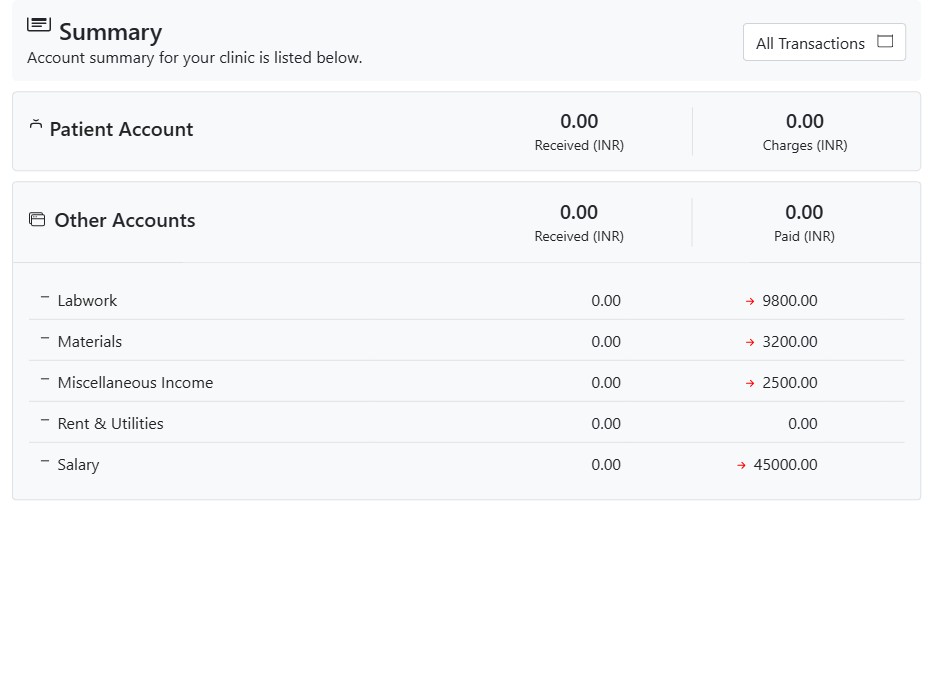
The Accounts module is the clinic’s book-keeping: it tracks every rupee that comes in and goes out, both from patients and from the running of the practice. It has two sides — patient money (what patients are billed and what they pay) and office money (salaries, lab bills, materials, rent and other income or expense) — and a summary that ties them together for any period.
What’s in the module
- Summary — a dated overview of Patient Account (Received / Charges) and Other Accounts (Received / Paid), with a per-head breakdown you can drill into. A date-range picker (All, This Month, Last Month, This Year…) scopes every figure.
- Patient account — each patient’s running ledger of charges and payments, their outstanding balance, and the tools to record a payment or refund.
- Bills — itemised invoices built from the procedures a patient has had.
- Account heads — the office income and expense categories (Salary, Labwork, Materials, Rent…) and their sub-heads.
- Other-account transactions — recording money paid out or received against those heads.
How the money adds up
On the patient side, Charges are what you bill (via bills) and Received is what patients pay; the difference is their balance. On the office side, each head collects its own Received (income) and Paid (expense). The Summary rolls all of this up so you can see, for any date range, exactly where the practice stands.
Reading the summary
A green left-arrow marks money in; a red right-arrow marks money out. Click any head to open its detailed transactions. Change the date range to compare a month, a quarter or a year.