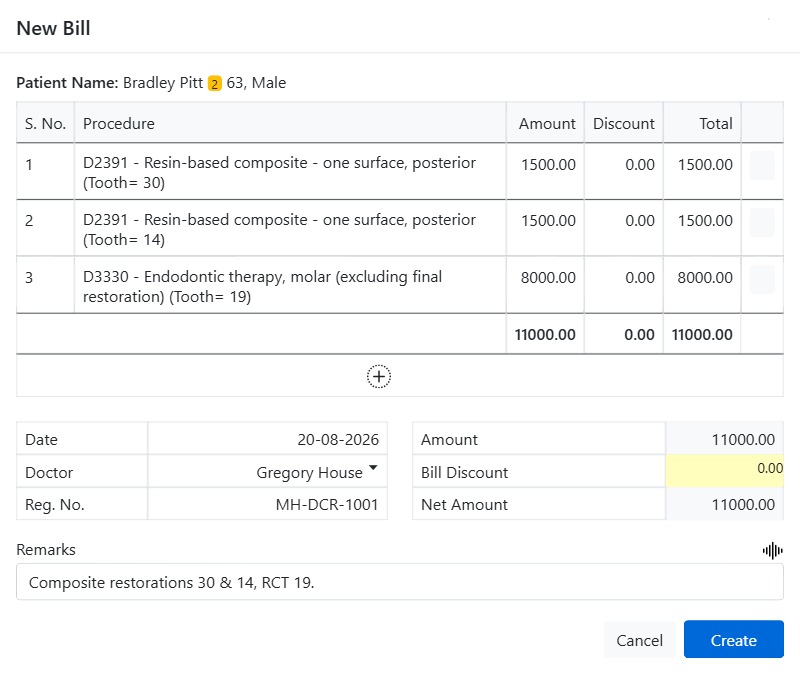
A bill is the itemised invoice you raise for the treatment a patient has had. CAPS28 builds it from the patient’s own procedures, so the charges always match the clinical record, and it carries the treating doctor’s details for a compliant invoice.
Creating a bill
- Go to Accounts → Bill, select the patient, and click New Bill.
- Click the + to open the list of the patient’s billable procedures and tick the ones to include. Each lands on the invoice with its Amount, an optional per-line Discount, and a line Total.
- Confirm the Doctor (provider) — the dropdown carries each provider’s Dental Council Reg. No. for the invoice.
- Apply a Bill Discount if needed; the Net Amount recalculates live.
- Add a Remark (with speech-to-text) and click Create.
What happens next
The bill gets a unique bill number and posts its net amount as a charge on the patient’s account, raising their balance. From the bill list you can search by bill number, view or print the invoice, and take a payment against it. Recording receipts against the bill reduces the outstanding balance until it is fully paid.
Why bill from procedures
Building invoices from the clinical procedures — rather than typing amounts by hand — keeps billing accurate and auditable: what was charged always maps back to what was done, and the office fee schedule feeds the line amounts automatically.