
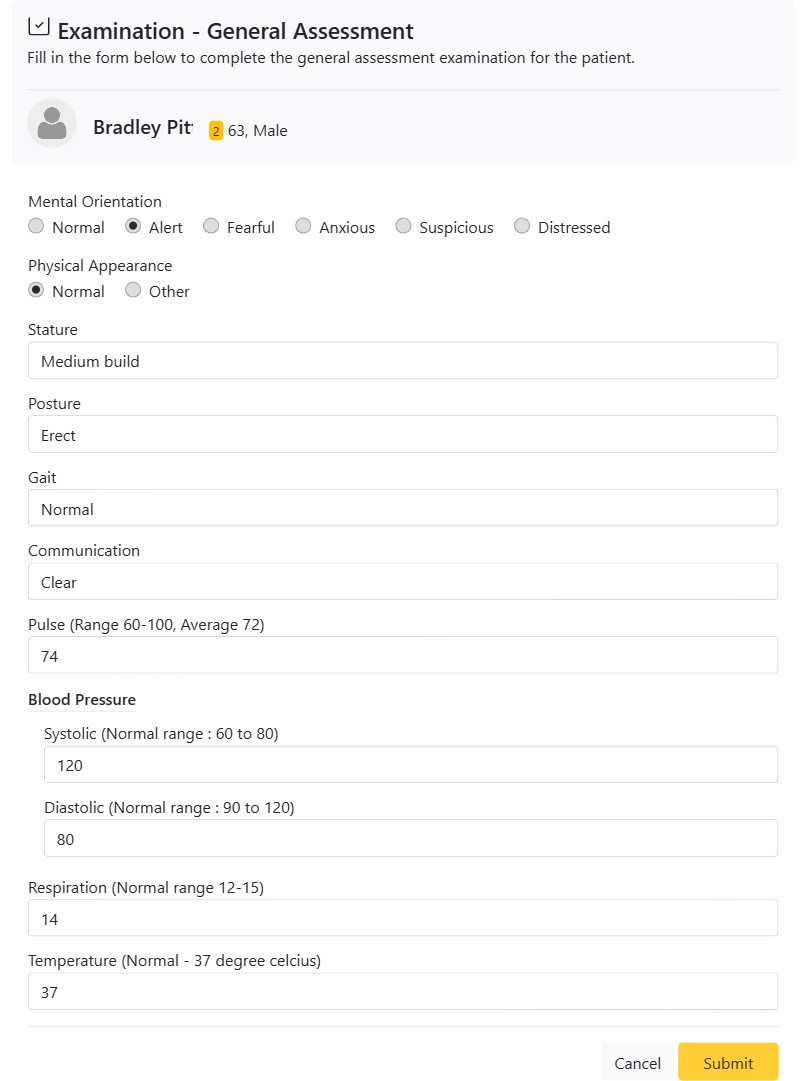
The General Assessment is the quickest of the three examination formats and is typically the first one you complete at a new-patient visit or before a procedure. On a single page it records the patient’s overall condition and a full set of baseline vital signs, giving you an at-a-glance picture of fitness for treatment and a reference point for future visits.
What the General Assessment records
- Mental Orientation — Normal, Alert, Fearful, Anxious, Suspicious or Distressed. A fast read on the patient’s state of mind, useful for planning anxiety management.
- Physical Appearance — Normal or Other (with room to describe).
- Stature, Posture, Gait, Communication — free-text observations of the patient’s build, bearing, movement and ability to communicate.
- Pulse — heart rate, with the normal range shown as a prompt (60–100, average 72).
- Blood Pressure — Systolic and Diastolic, each with its normal range as a guide.
- Respiration — breaths per minute (normal 12–15).
- Temperature — body temperature (normal ~37 °C).
Why it matters
Recording vitals before treatment is a basic safety check: an unexpectedly high blood pressure or pulse can be a reason to defer an elective procedure or refer for a medical opinion. Because CAPS28 stores each General Assessment with a date, you build a running record of the patient’s baseline observations that any clinician in the practice can pull up later. The inline normal ranges act as a built-in reference so even a new team member records values with the right context.
How to complete a General Assessment
- On the Examinations tab, click New → General Assessment.
- Select the orientation and appearance options and type your observations.
- Enter the measured vital signs.
- Save — the assessment is filed against the patient and available as a PDF.